Free up your Mac.
Safely.
Get rid of the "Disk Almost Full" alert. See what is taking up space and safely clear gigabytes of hidden clutter with one click. No subscriptions. Ever.


If you own a Mac, this has happened to you.
We read what Mac owners actually post on Reddit and Apple Support forums. The same frustrations appear every single day.
"What actually is 'System Data' and why is it 85 GB?"
Apple shows a giant gray bar with zero explanation and no button to clean it.
"I dragged the app to Trash. Why did my free space not change?"
Hidden support folders and caches stay behind, eating storage in silence.
"Why does a disk cleaner want a $40/year subscription?!"
Paying a yearly recurring fee just to clear caches on your own computer feels absurd.
"I'm terrified to clean anything in case it erases my photos."
Scary terminal commands and permanent deletion tools create constant anxiety.
"The 'Disk Almost Full' alert popped up right during my meeting."
macOS refuses to save files and iCloud syncing freezes when you need it most.
"It installed 3 background helpers and my battery drains fast."
Bloated cleaning suites run 24/7 in your menu bar, hogging RAM and battery life.
Don't guess where your space went. See it.
Disk Explorer turns your storage into an intuitive visual map. Big folders look big; small folders look small.
Spot giant folders in seconds.
Explore how DiskCompanion turns complex storage hierarchies into intuitive concentric rings. Hidden clutter is revealed instantly:
Apple groups temporary app caches, streaming buffers, and web data into mystery "System Data" that macOS never clears on its own.
Where did your storage go? Solved.
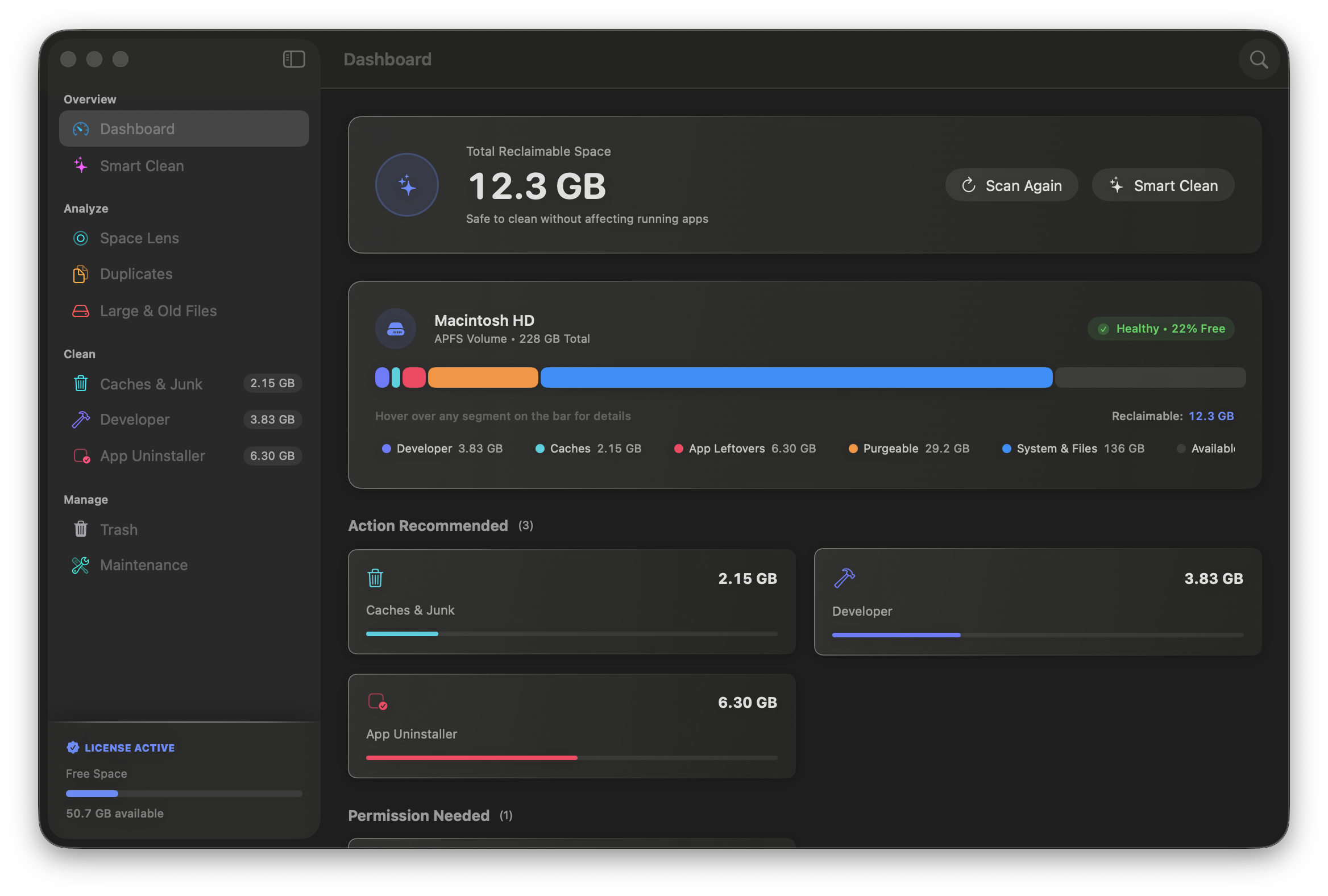
Apple shows a giant gray bar called "System Data" with zero explanation. DiskCompanion reveals what is taking up room and frees up gigabytes with one safe click.
System Data & Caches
15 to 45 GB typically freedApple's mystery "System Data" hides old streaming video caches, browser junk, and diagnostic logs that macOS never clears on its own.
Uninstalled App Leftovers
10 to 30 GB typically freedDragging an app to Trash leaves behind support folders, cached data, and startup background helpers. DiskCompanion sweeps away every trace.
Duplicate Photos & Files
8 to 25 GB typically freedAccidental double downloads, identical photo imports, and duplicate documents quietly eat up space. Easily preview and remove identical copies.
100% Reversible (Mac Trash)
100% UndoableClean with zero fear. Every item moves to your normal Mac Trash. If you change your mind, right-click and choose "Put Back" in Finder.
Reclaim your Mac in four clean steps.
No complicated installers or background assistants. Download the app, scan your drive, and take back your storage.
Download & Launch
Download the lightweight (< 10 MB) DiskCompanion application notarized officially by Apple. DiskCompanion requires no installer wizards, creates no user accounts, and installs zero background helpers or launch daemons on your Mac.
Instant Scan
Click Scan to initiate an instant drive analysis. DiskCompanion maps your entire APFS file system in under 15 seconds, using less than 50 MB of RAM without slowing down your active apps or draining your MacBook battery.
Inspect Your Drive
Explore your storage with the interactive Disk Explorer visual map. DiskCompanion visually highlights multi-gigabyte folders, Xcode developer build caches, and bloated System Data containers so you can inspect what is taking up space at a glance.
Clean Safely
Reclaim gigabytes of storage with a single safe click. DiskCompanion routes every cleaned cache and leftover file directly into your macOS Trash, ensuring all cleanups remain 100% reversible with Finder's Put Back command.
A Mac cleaner that actually respects you.
Why pay $40 every year for heavy apps that drain your battery, when a tiny app under 10 MB does the job safely?
| Feature / Dimension |
DiskCompanion
Native macOS
|
Heavy Cleaning Suites
Heavy $40/yr Subscriptions
|
Single-Purpose Tools
Visualizer Only (No Cleaning)
|
|---|---|---|---|
| Subscription Cost |
$29 one-time (Yours forever, 3 Macs)
|
$39.95 / year (Recurring renewal) | $10+ or outdated free tools |
| Accidental Deletion Safety |
100% Reversible (Mac Trash & Put Back)
|
Immediate permanent deletion | Manual Finder deletion only |
| Background Battery Drain |
Zero (Completely exits when closed)
|
2 to 3 background helpers running 24/7 | Zero |
| Download Size & Speed |
< 10 MB (Native Swift, instant launch)
|
120 MB to 200 MB (Heavy web wrapper) | 12 MB to 25 MB |
| Visual Storage Map |
Included (Disk Explorer visual map)
|
Missing (Confusing lists only) | Included (Visualizer only, no cleaning) |
Buy once. Own forever.
No subscriptions. No hidden upgrades. No cloud logins.
Free Evaluation
Scan any drive, explore your storage with Disk Explorer, and see exactly what is taking up space before you pay a dime.
- Full disk scanning across all drives & APFS volumes
- Interactive Disk Explorer visual storage map
- Inspect hidden System Data caches & video buffers
- Inspect leftover files from uninstalled apps
- Duplicate photo and document detection preview
- Large & forgotten files scanner
- Works on Apple Silicon (M1, M2, M3, M4, M5) & Intel Macs
- Zero background daemons or battery drain
Lifetime Pro
Covers up to 3 personal Macs
- Everything in Free Evaluation
- One-click safe Smart Clean
- Clean hidden System Data caches & video buffers
- Complete leftover application uninstaller
- Smart duplicate photo & document cleaner
- Large & forgotten files cleaner
- Developer & creator cache tools (Xcode, Adobe, Node)
- Valid for up to 3 personal Macs
- All future v1.x maintenance updates included
Frequently Asked Questions
Everything you need to know about DiskCompanion's architecture, safety model, and licensing.
Will DiskCompanion delete my personal photos, documents, or desktop files?
Never. DiskCompanion is permanently locked from touching your personal files. Your Documents, Desktop, Photos library, Music collection, and iCloud Drive directories are 100% safe. DiskCompanion only cleans temporary clutter like streaming video buffers, expired web caches, Xcode build files, and leftover files from deleted apps.
What happens if I clean something by accident? Can I get it back?
Yes, instantly. Unlike other cleaners that permanently erase files with terminal commands, DiskCompanion routes every cleaned file directly to your normal macOS Trash. If you ever change your mind, just open Trash in Finder, right-click the file, and choose 'Put Back' to restore it to its original folder. Nothing is permanently erased until you manually empty your Mac Trash.
What actually is that giant gray 'System Data' bar in my Mac settings?
macOS System Data refers to the category of storage containing temporary cache files, application support assets, developer build directories, and APFS local snapshots that macOS does not classify into user documents or apps. In macOS Sonoma and macOS Sequoia, System Data commonly accumulates between 40 GB and 120 GB of disk space due to abandoned Xcode derived data, iOS device backups, and streaming media caches from Spotify and browser engines. While macOS provides no native button to clear this category, native storage utilities like DiskCompanion safely reclaim 10 GB to 40 GB of storage in under 60 seconds. DiskCompanion scans sandbox containers, identifies orphaned cache files, and isolates them into the macOS Trash, ensuring all cleanups remain 100% reversible without deleting personal documents or risking system integrity.
Does DiskCompanion run in the background or drain my MacBook battery?
No, absolutely not. Unlike legacy cleaner suites that install persistent background daemons consuming 400 MB to 600 MB of RAM 24/7, DiskCompanion operates with zero background helpers. DiskCompanion is engineered natively in Swift and only runs when you actively open it. The moment you quit the application, it completely unloads from memory and consumes 0% CPU. There are no hidden menu bar helpers, no background telemetry agents, and zero battery drain on your MacBook.
Do I have to pay a recurring monthly or yearly subscription?
No. DiskCompanion is sold as a transparent, one-time purchase of $29 USD for up to 3 personal Macs, with all future maintenance updates included. Unlike subscription-based cleaners that charge $39.95 to $60 every year to delete caches on your own computer, DiskCompanion has no monthly fees, no annual renewals, and no surprise charges. You can also scan your drive and explore storage completely free before purchasing.
Is DiskCompanion notarized by Apple and safe to install?
Yes. Every release of DiskCompanion is officially inspected and notarized by Apple. Apple scans the code for security defects and malicious behavior before issuing an official cryptographic notarization ticket. When you double-click DiskCompanion on macOS Sonoma or Sequoia, your Mac validates Apple's notarization ticket instantly, launching smoothly with zero security warnings.
Which Mac models and processors are supported?
DiskCompanion is fully compatible with macOS 14.0 Sonoma, macOS 15.0 Sequoia, and later. It natively supports Apple Silicon M1, M2, M3, M4, and M5 processors (MacBook Air, MacBook Pro, Mac mini, Mac Studio, iMac, and Mac Pro) as well as Intel-based Macs (Core i5, i7, and i9).

Give your Mac room to breathe.
Zero recurring subscriptions. Zero background helpers. Download the free < 10 MB app and see what is taking up space on your Mac in seconds.